Launch Monitor vs Golf Simulator: What’s the Difference?
Golf technology has transformed how players practice, train, and enjoy the game indoors. Two popular innovations often discussed are the launch monitor and the golf simulator. Many people assume both terms mean the same thing, yet they serve different purposes and offer distinct experiences. Understanding how each system works, what features they provide, and who benefits most from them helps buyers and players make smarter decisions.
This guide explains the real difference between a launch monitor and a golf simulator, how they function, where they overlap, and which option fits various playing goals.
Understanding a Launch Monitor
A launch monitor is a tracking device that measures ball and club performance at impact and during early flight. Its main purpose is data collection and shot analysis. Players, instructors, and equipment fitters rely on this technology to evaluate swing behavior and ball response.
These devices use sensors, radar, high-speed cameras, or a hybrid of both to capture detailed metrics. After each strike, the unit displays numerical feedback that reveals how efficiently the shot was delivered.
Typical Measurements Include:
- Ball speed
- Club speed
- Launch angle
- Spin rate
- Carry distance
- Smash factor
- Attack angle
- Face direction
- Path movement
This information allows golfers to understand strengths, weaknesses, and consistency patterns. Instead of guessing why a shot curves or falls short, the player sees objective numbers.
Primary Purpose
The main goal of a launch monitor is performance analysis. It is widely used for:
- Swing improvement
- Equipment fitting
- Skill development
- Distance gapping
- Technique comparison
Some models are compact and portable, making them suitable for driving ranges or home practice areas.
Understanding a Golf Simulator
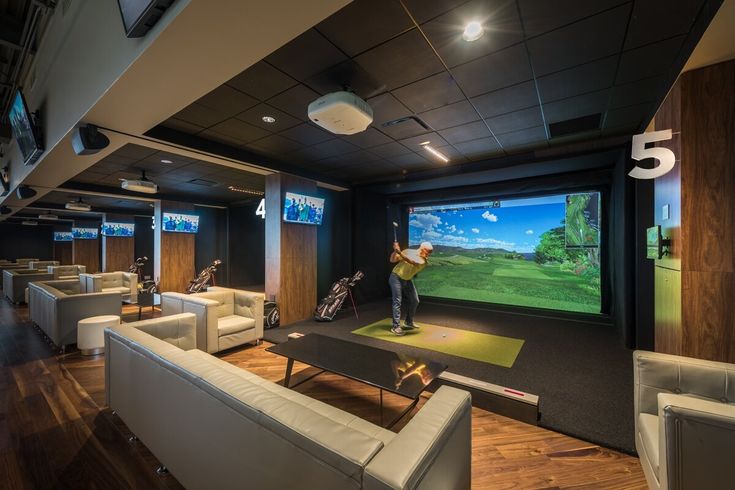
A golf simulator is a complete virtual playing environment that recreates course conditions indoors. It combines tracking hardware, simulation software, and a visual display to let players hit shots into a screen and watch ball flight in a digital world.
Unlike a basic measuring device, this setup focuses on immersive gameplay. It allows users to play full rounds, practice on simulated holes, and compete in challenges without visiting an outdoor facility.
A Typical Simulator Setup Includes:
- Shot tracking sensor
- Simulation software
- Impact screen or enclosure
- Projector or large display
- Hitting mat
- Computer or console
When a ball is struck, the sensor reads impact details, software calculates trajectory, and the projected image shows the shot traveling across a virtual course.
Primary Purpose
The central aim of a golf simulator is interactive experience. It is commonly used for:
- Indoor rounds
- Entertainment
- Skill practice with visuals
- League play
- Weather-proof training
It turns practice into a game-like session rather than a numbers-only review.
Core Difference in Function
The biggest distinction comes down to analysis versus simulation.
A launch monitor focuses on measurement and feedback. It tells you what happened at impact and during initial travel. A golf simulator price focuses on recreation and visualization. It shows where the shot goes on a digital course.
Think of the first as a diagnostic instrument and the second as a virtual playing platform. One explains performance through statistics. The other recreates play through graphics.
Hardware Requirements
Both systems rely on sensing technology, yet their setup demands differ greatly.
Launch Monitor Equipment Needs
A measurement unit alone is often enough. Some versions connect to a phone or tablet for display. Others include built-in screens. Space requirements are usually minimal, depending on the sensing method used.
Portable models can be placed behind or beside the hitting area. Camera-based units typically sit near the ball, while radar-based versions are positioned several feet away.
Simulator Equipment Needs
A simulator requires more components and space. Besides tracking hardware, users need:
- Projection surface
- Protective enclosure
- Display system
- Software platform
- Adequate ceiling height
- Room depth for safe swings
Because of these factors, installation is more complex and often permanent.
Data Depth vs Visual Experience
Another major difference lies in output style.
A launch monitor emphasizes numeric detail. After each strike, it provides multiple performance parameters. This is ideal for technical improvement and club fitting.
A simulator emphasizes visual ball flight and course interaction. While many units also provide data, the presentation centers on graphics and gameplay rather than raw numbers.
Players who enjoy studying metrics may prefer a measurement-focused device. Those who value immersive practice often prefer simulation environments.
Accuracy and Precision
Accuracy depends on sensor quality, calibration, and placement rather than category alone. Both systems can be extremely precise when properly configured.
High-end launch monitors for golf are often considered the gold standard for swing analysis because they specialize in measurement. Their algorithms are optimized for data reliability.
Simulators that use advanced tracking hardware can also produce excellent numbers, but entry-level packages may estimate certain values instead of directly measuring them.
In short:
- Dedicated monitors usually prioritize measurement precision
- Simulator packages prioritize playability and visualization
Practice Style Differences
Training style changes depending on which technology is used.
Practice with a Launch Monitor
Sessions are typically structured and data-driven. A golfer might hit multiple shots with one club and compare metrics. Adjustments are made based on numbers rather than visual flight alone.
This approach is ideal for:
- Swing changes
- Yardage calibration
- Equipment comparison
- Skill benchmarking
Practice with a Simulator
Sessions feel more like playing a round. Users aim at virtual targets and navigate holes. This encourages situational decision-making and shot variety.
This method is helpful for:
- Course management
- Shot shaping practice
- Pressure simulation
- Enjoyment-based repetition
Portability Comparison
Portability is another separator.
Many launch monitors are lightweight and travel-friendly. Some fit in a small bag and operate on battery power. This makes them useful outdoors or at different practice locations.
Simulators are generally fixed installations. Because they include screens, mounts, and projection systems, moving them is not convenient. Compact simulator packages exist, but full setups are usually stationary.
Cost Structure
Price varies widely in both categories, yet spending patterns differ.
Launch monitors range from budget-friendly personal units to professional-grade instruments. Entry options provide basic metrics, while premium versions deliver extensive analytics.
Simulators often cost more overall because they include multiple components. Expenses may include:
- Tracking hardware
- Software licenses
- Display equipment
- Installation materials
Even when using a modest tracking device, enclosure and projection costs can add up.
Software Role
Software plays a larger role in simulation systems.
A launch monitor may use an app to display shot numbers and store session history. The software’s role is supportive.
A simulator depends heavily on software to create courses, physics modeling, scoring, and multiplayer features. Without simulation software, the experience would not exist.
Some advanced launch monitors can connect to simulation programs, effectively allowing one device to serve both roles when paired with the right platform.
Overlap Between Both Technologies
Modern systems increasingly blur the line between categories. Many tracking devices now support simulation software integration. That means a launch monitor can become part of a simulator setup.
However, not every simulator tracking unit offers deep analytics. Capability depends on sensor sophistication and software compatibility.
So while overlap exists, the intended primary function still separates them:
- Measurement-first devices focus on analytics
- Simulation-first systems focus on virtual play
Who Should Choose a Launch Monitor
A launch monitor is best suited for players who want measurable improvement and technical feedback. It is especially useful for those who:
- Like reviewing performance numbers
- Work on swing mechanics
- Need distance accuracy
- Practice frequently at ranges
- Compare equipment changes
Coaches and club fitters also rely heavily on this type of technology.
Who Should Choose a Golf Simulator
A simulator is ideal for players who want immersive indoor golf and year-round access. It benefits those who:
- Want to play virtual rounds
- Practice regardless of weather
- Enjoy interactive training
- Create entertainment spaces
- Host group sessions
It is popular in homes, studios, and indoor facilities where space allows full installation.
Space Considerations
Room size influences the decision.
A launch monitor usually requires less area. Some units work well in short indoor spaces or outdoor ranges.
A simulator requires sufficient ceiling height, width, and depth to allow safe swings and proper projection distance. Without enough room, installation becomes difficult.
Training Outcomes
Both tools improve performance, but through different paths.
A launch monitor improves skill through data awareness and measurable change. It answers “why” a shot behaved a certain way.
A simulator improves skill through repetition and situational practice. It answers “how” to execute shots during realistic play scenarios.
Many serious golfers eventually use both for complete development.
Final Thoughts
While the terms are often used interchangeably, a launch monitor and a golf simulator are not the same. One is primarily a performance tracking instrument that delivers shot data. The other is a virtual playing environment that recreates course experiences indoors.
Choosing between them depends on your goals, available space, budget, and preferred training style. If you want detailed feedback and swing analysis, a launch monitor is the better match. If you want immersive indoor rounds and interactive practice, a golf simulator makes more sense.
For golfers seeking the best of both worlds, combining a quality tracking device with simulation software can deliver a powerful, flexible practice and play solution.