Best Golf Simulator Features That Deliver Realistic Results
Realism Begins With Precise Ball Tracking
A convincing golf simulation should do more than show a virtual fairway on a screen. The real test is whether the system can understand what happens when the club meets the ball and translate that physical action into a reliable digital result. For serious players, that distinction matters. A visually impressive setup may entertain, but accurate measurement is what makes a simulator genuinely useful for practice.
Modern systems can monitor several aspects of a shot, including ball speed, launch angle, spin, direction, carry distance and club movement. When these measurements are captured consistently, golfers can understand why a shot behaved the way it did instead of relying entirely on feel.
For players considering an Indoor Golf Simulator Dubai setup, accuracy should therefore be placed ahead of decorative features. The best technology is the technology that helps the golfer make better decisions about technique.
Understanding Launch Data
Launch information provides an immediate snapshot of the shot. Ball speed indicates how efficiently energy has been transferred, while launch angle helps explain the trajectory. Spin rate adds another layer by showing how the ball may climb, curve or stop.
When several measurements are considered together, a golfer receives a much clearer picture than distance alone can provide.
Club Data Adds Another Layer
Ball tracking is only part of the equation. More advanced systems can also measure club-related information. Clubhead speed, path, face angle and impact position can reveal details that are difficult to identify through observation.
A player might believe that a slice is caused by an open stance, for example, when the underlying issue is actually the relationship between club path and face angle. Data can turn a vague problem into something measurable.
This is particularly valuable during structured practice sessions. Instead of hitting dozens of balls without a clear objective, a golfer can work on a specific variable and observe whether the numbers improve.
Screen Quality Should Support, Not Distract
Visual presentation still matters. A bright, high-resolution image creates a more immersive environment, particularly when the simulator is being used for entertainment as well as practice.
However, image quality should complement the tracking technology rather than compensate for weak measurement. A large display cannot make inaccurate data useful.
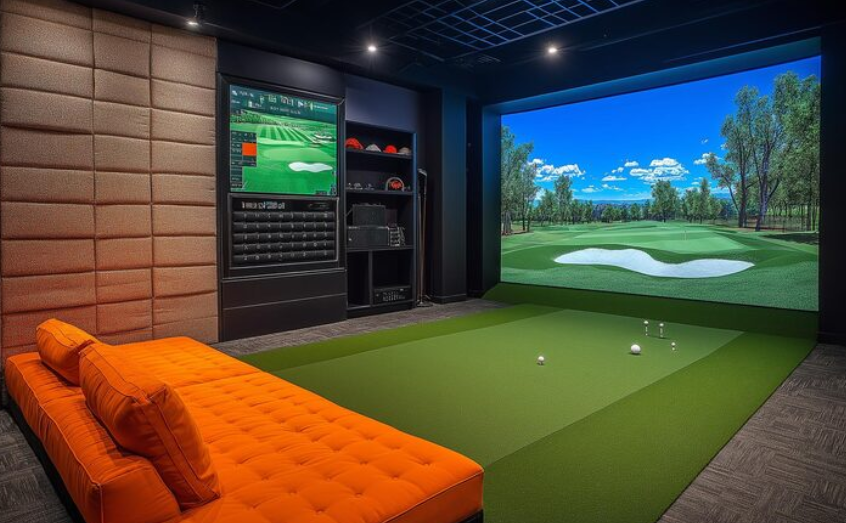
The ideal setup combines a responsive tracking system with a clear image, suitable screen dimensions and enough space around the hitting area. The result should feel natural without compromising practical performance.
Why Impact Screens Matter
The impact screen has several responsibilities. It must withstand repeated shots, display the virtual course clearly and work safely within the room. Its material, tension and installation can influence both image quality and longevity.
A poorly fitted screen may create distracting ripples or inconsistent projection. A carefully installed one provides a cleaner visual field and contributes to a more professional environment.
Space Planning Is Part of Accuracy
Even excellent technology can perform poorly when installed in an unsuitable environment. The hitting position, screen distance, ceiling height and surrounding clearance should all be considered before installation.
A golfer needs enough room to swing naturally without feeling restricted. The tracking equipment also needs an appropriate position to capture the shot correctly.
Lighting can matter as well. Excessive direct light may affect visibility, while reflections can reduce the quality of the projected image.
Designing Around the Golfer
A successful simulator room should be planned around how people will actually use it. The hitting surface should feel stable, the screen should be positioned comfortably and equipment should remain accessible without becoming cluttered.
Seating, storage and lighting can then be added without interfering with the core playing area.
Software Makes the Data Meaningful
Hardware gathers information, but software determines how easily that information can be interpreted. Good simulator software should present statistics in a straightforward format rather than overwhelming users with unnecessary numbers.
Practice modes can allow golfers to repeat particular shots, examine dispersion patterns or compare performance over time. Course-play functions add an entertainment dimension, while skills challenges can make training more engaging.
For a Commercial Golf Simulator, software flexibility becomes especially important because different users may have completely different expectations. One visitor may want casual entertainment, another may want structured practice, and an experienced golfer may focus heavily on performance metrics.
Choosing Features With Long-Term Value
The most impressive simulator is not necessarily the one with the longest feature list. A better approach is to identify the capabilities that genuinely improve practice, entertainment and usability.
Reliable tracking, useful club and ball data, responsive software, quality projection and thoughtful installation usually provide more value than unnecessary extras.
A realistic simulation ultimately comes from several components working together. When measurement, visuals, software and room design are properly balanced, the experience becomes far more than a game on a screen. It becomes a practical training environment that can support improvement while still making every round enjoyable.